
Whitelabel branding
Whitelabel your Booknetic SaaS — logos, backend title, powered-by text, custom CSS, branded signup pages, email sender, and per-plan branding capabilities.

By using this site, you agree to our Cookie Policy
Whitelabel your Booknetic SaaS — logos, backend title, powered-by text, custom CSS, branded signup pages, email sender, and per-plan branding capabilities.
Whitelabel branding helps your Booknetic SaaS platform feel like your product.
Your tenants should see your platform name, your logo, your support link, your signup pages, and your email sender — not a confusing mix of your brand and Booknetic's default branding.
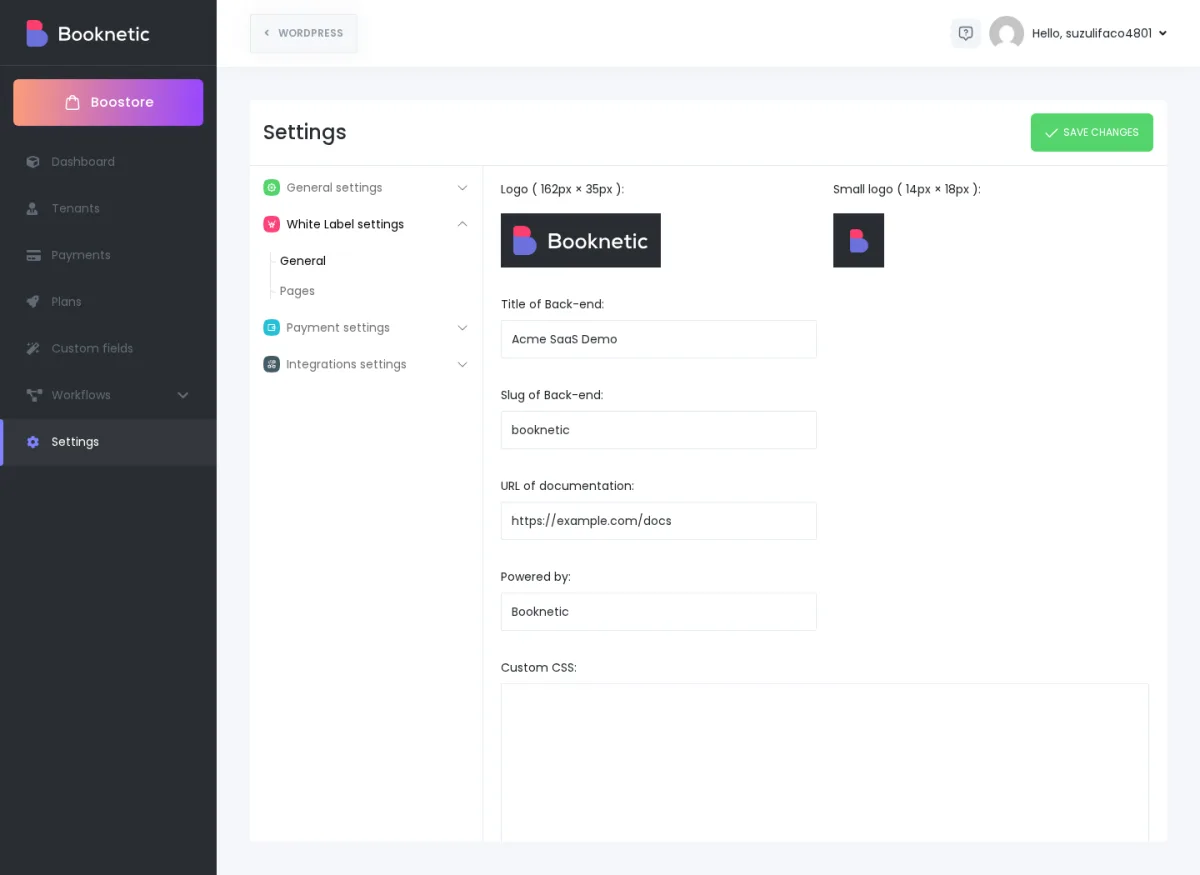
In Booknetic SaaS, the source-confirmed whitelabel controls focus mainly on the backend/admin experience. They let you change the logo, small logo, backend title, backend URL slug, documentation link, powered-by text, and custom admin CSS. You can combine those settings with branded WordPress pages, tenant URL setup, and email sender settings to create a much more consistent SaaS experience.
Simple goal: when a tenant signs up, signs in, opens their admin panel, receives platform emails, or shares a booking link, the journey should feel like one trusted brand.
Use this table as the quick map before you start.
| Branding area | Where to configure it | What it changes | Important note |
|---|---|---|---|
Main backend logo |
Settings → White Label settings → General → Logo |
The main logo used in the Booknetic/ |
Source-backed recommended size: 162×35 px for the whitelabel addon. |
Small backend logo |
Settings → White Label settings → General → Small logo |
Compact/ |
Source-backed recommended size: 14×18 px for the whitelabel addon. |
Backend title |
Title of Back-end |
The admin/ |
Use your customer-facing platform name. |
Backend slug |
Slug of Back-end |
The backend URL slug, such as wp-admin/. |
Do this before launch when possible; changing it later can confuse bookmarked links. |
Documentation/ |
URL of documentation |
Sends tenants to your help center or onboarding docs. |
Make sure tenants can access the page without internal login barriers. |
Powered-by text |
Powered by |
Changes the powered-by/ |
Full removal is plan/ |
Custom admin styling |
Custom CSS |
Adds CSS to the admin panel. |
Use for visual adjustments, not for access control or feature changes. |
Signup/ |
White Label settings → Pages + WordPress pages |
Lets you place SaaS shortcodes on branded public pages. |
This is how your public funnel stays on-brand. |
Email sender |
Settings → Integrations settings → Email settings |
Sender name and sender email for SaaS workflow emails. |
Reliable branded email usually requires SMTP plus SPF/ |
Tenant booking URL style |
Routing/ |
Directory-style or subdomain-style tenant booking links. |
Directory mode is the simpler verified starting point; subdomain style needs DNS/ |
Per-tenant branding permissions |
Plans → Capabilities |
Lets you decide whether a tenant can upload branding / remove branding, depending on available capabilities. |
Use plans to turn branding into a paid capability. |
For the complete SaaS settings reference, see SaaS Settings reference.
Open WP Admin → Booknetic SaaS → Settings → White Label settings → General.
Then update these fields in order:
A good first pass is simple: logo, title, documentation link, sender name, and branded signup page. Add custom CSS only after the basic identity is correct.
Booknetic's source-backed whitelabel addon validation expects two exact logo sizes:
| Logo type | Recommended size | Best use | File types |
|---|---|---|---|
Main logo |
162×35 px |
Main backend/ |
JPG, JPEG, PNG, SVG |
Small logo |
14×18 px |
Compact/ |
JPG, JPEG, PNG, SVG |
If you are designing broader brand assets for public WordPress pages, you can also prepare these practical web sizes:
| Surface | Practical design size | Why |
|---|---|---|
| Signup/ |
About 200×60 px | Gives your WordPress page builder enough room for a readable horizontal logo. |
| Tenant admin sidebar / compact area | About 150×50 px as a source asset, then export to the exact required size if the UI validates dimensions. | Keeps the source file crisp while still letting you meet the exact UI requirement. |
| Customer booking widget header area | About 200×60 px if your page/ |
The booking widget usually sits inside your WordPress page, so the surrounding page design controls much of this branding. |
Important: if the upload screen rejects or fails to preview your logo, check dimensions first. The whitelabel addon source validates the main logo as 162×35 px and the small logo as 14×18 px.
Whitelabel settings are only one part of the brand experience. Your public SaaS funnel lives on WordPress pages.
Go to Settings → White Label settings → Pages and make sure each page points to the right WordPress page:
[booknetic-saas-signin].[booknetic-saas-signup].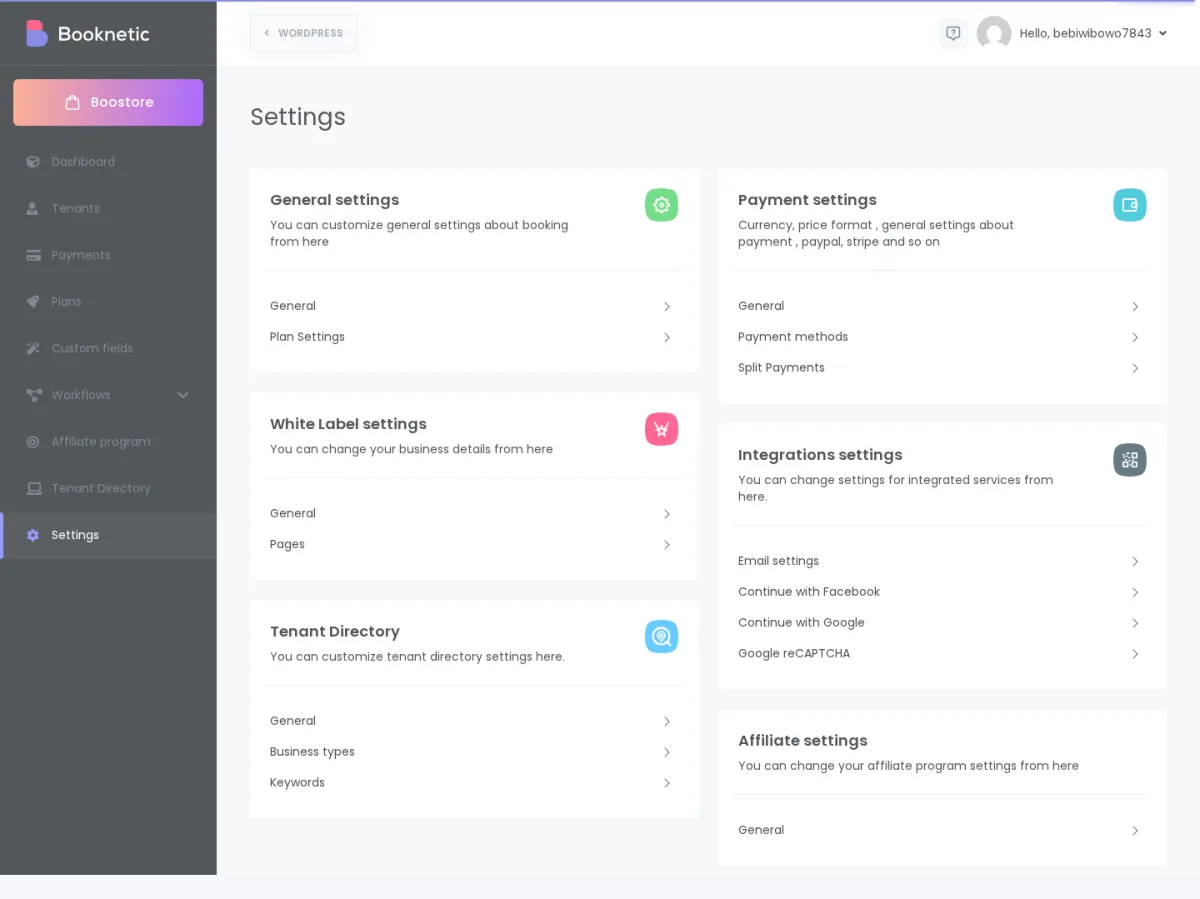
Then design those WordPress pages with the same logo, colors, typography, and message.
For the tenant signup journey, see Tenant signup walkthrough.
The reviewed whitelabel sources confirm Custom CSS. They do not confirm a separate native "primary color / secondary color / accent color" preview panel inside Whitelabel settings.
That means your color system usually comes from three places:
Use a simple brand kit before editing CSS:
| Token | Example | Use it for |
|---|---|---|
| Primary color | #2563EB |
Main buttons, links, active states. |
| Secondary color | #0F172A |
Headings, dark sidebar, strong text. |
| Accent color | #22C55E |
Success states, badges, highlights. |
| Neutral background | #F8FAFC |
Page backgrounds, soft panels. |
| Border color | #E2E8F0 |
Cards, fields, separators. |
Safe rule: use your WordPress theme for public pages and Custom CSS for small admin polish. Do not use CSS to "unlock" hidden features, bypass plan limits, or hide important warnings.
Custom CSS is useful when you need small visual changes that are not available as normal settings. Test each snippet on a staging site or shared docs sandbox before applying it to a live platform.
Use this when your brand uses rounded or squared buttons.
/* Brand button radius */
.booknetic_btn_primary,
.booknetic_btn_success,
.booknetic_btn_secondary {
  border-radius: 10px !important;
}
Replace the hex values with your own brand colors.
/* Primary brand buttons */
.booknetic_btn_primary,
.booknetic_btn_success {
  background-color: #2563EB !important;
  border-color: #2563EB !important;
  color: #ffffff !important;
}

.booknetic_btn_primary:hover,
.booknetic_btn_success:hover {
  background-color: #1D4ED8 !important;
  border-color: #1D4ED8 !important;
}
Use a web-safe provider and confirm the font license allows use in your SaaS.
/* Example: import a brand font */
@import url('https://fonts.googleapis.com/css2?family=Inter:wght@400;500;600;700&display=swap');

.booknetic_app,
.booknetic_app * {
  font-family: 'Inter', Arial, sans-serif !important;
}
Use this if admin or widget spacing feels too tight on small screens.
/* Small-screen spacing */
@media (max-width: 767px) {
  .booknetic_app {
    padding-left: 12px !important;
    padding-right: 12px !important;
  }

  .booknetic_btn_primary,
  .booknetic_btn_success {
    width: 100%;
  }
}
Only use this if your Booknetic SaaS license, plan setup, and internal policy allow powered-by removal for that surface. CSS can hide a visible label, but it does not change licensing, capabilities, or product policy.
/* Use only when powered-by removal is allowed for this surface */
.booknetic_powered_by,
.booknetic-powered-by,
[class*="powered-by"] {
  display: none !important;
}
Do not rely on CSS as your main removal method. Use the official Powered by setting and the relevant plan capability first. CSS is only a visual fallback for allowed surfaces.
There are two different things customers often mean by "remove Powered by Booknetic."
| Surface | Source-backed answer |
|---|---|
| Backend powered-by text | White Label settings include a Powered by field. You can change the text shown in the relevant backend/ |
| Tenant booking-panel branding | Plans may include a branding-related capability such as Remove branding. Whether a tenant gets that removal depends on the plan/ |
| Every Booknetic reference everywhere | Do not assume this is guaranteed. The reviewed sources do not prove "remove every Booknetic reference from every admin, customer, mobile, email, and booking surface." |
So the safe customer-facing answer is:
You can customize the powered-by text in White Label settings, and you can use plan capabilities to control branding removal where Booknetic exposes that capability. If you need complete removal from every surface, confirm the exact surfaces and plan/license policy before promising it to tenants.
For per-plan capability setup, see Plans and capabilities.
A branded domain is one of the biggest trust signals in a SaaS funnel. A signup page at:
https://bookings.yourbrand.com/start
usually feels more trustworthy than a temporary sandbox or raw hosting URL.
In Booknetic SaaS, tenant booking links are usually discussed in two URL styles:
| URL style | Example | Best for |
|---|---|---|
| Directory style | yourbrand. |
Most new platforms; simpler setup and fewer DNS issues. |
| Subdomain style | aurora-wellness. |
Platforms that specifically want tenant-branded subdomains and can manage DNS, hosting, and SSL correctly. |
Directory-style tenant URLs are the safer verified starting point. Subdomain-style URLs require wildcard DNS such as:
*.yourbrand.com
That wildcard record must point to the same WordPress/SaaS installation, and your hosting/SSL setup must accept the tenant subdomains.
A separate "custom domain" switch inside the reviewed White Label settings was not confirmed. Treat domain work as a combination of hosting, DNS, WordPress site URL, and Booknetic tenant-routing setup — not as a simple logo-style setting.
For the full routing guide, see Tenant URLs and routing.
Whitelabel branding also includes the messages tenants receive from your platform.
Open Settings → Integrations settings → Email settings and review:
Use a sender name tenants recognize, such as your SaaS platform name.
Sender Name: Aurora Booking Platform
Sender E-mail: [email protected]
For production, branded email often needs more than filling two fields. Ask your email provider or infrastructure owner to confirm:
You do not need to explain SPF/DKIM to tenants in your marketing copy, but you do need them configured if you want activation, password, onboarding, and reminder emails to land reliably.
For channel setup and email sender behavior, see Notification channels for your tenants.
Whitelabel can be part of your pricing strategy.
For example, you may decide:
| Plan | Branding offer |
|---|---|
| Starter | Uses your platform brand; limited customization. |
| Pro | Tenant can upload their own logo to the booking panel, if the capability is available. |
| Agency / Scale | Branding removal and deeper visual customization, if your license/ |
| Enterprise | Manual/ |
This is configured through plan capabilities, not by manually editing every tenant one by one.
The source-backed capabilities to look for include branding-related items such as Remove branding, Upload logo to booking panel, and whitelabel-related tenant settings where available. The exact labels can vary by installed addons and build, so use the Capabilities tab in your own SaaS as the final list.
For the plan model, see Plans and capabilities.
Yes, if your installed addons and plan capabilities expose tenant-side branding controls for that tenant.
There are two brand layers:
If tenant-side whitelabel settings are enabled through the relevant capability, a tenant can apply their own branding within the surfaces Booknetic exposes to them. If the capability is not included in their plan, they should not expect that control to appear.
Avoid the common confusion: the company image a tenant adds during signup is not the same setting as the SaaS owner's main whitelabel logo.
For the tenant-side customisation surface, see What each tenant can customise in Booknetic SaaS.
You can use plans to offer different branding permissions to different tenant tiers.
For example:
What you should not promise without confirmation is a completely separate platform skin for every plan tier. The reviewed source confirms capability-gated branding controls, not a full multi-theme engine per plan.
A dedicated favicon field was not confirmed in the reviewed Whitelabel settings.
For public WordPress pages, set the favicon through your WordPress theme or Appearance → Customize → Site Identity → Site Icon, depending on your WordPress setup.
For the Booknetic admin/browser favicon specifically, confirm with Product or support before promising a tenant-facing favicon setting. The source-backed whitelabel controls are Logo, Small logo, backend title, backend slug, documentation URL, powered-by text, and Custom CSS.
Use this checklist before inviting tenants or sending paid traffic to your SaaS signup page.
[booknetic-saas-signup].A tenant should not feel like they entered one product on the signup page and landed in a different product after login.
Use the same logo, sender name, domain, colors, and wording across:
A temporary sandbox URL is fine for setup work, but not for acquisition.
A branded domain improves trust, makes links easier to remember, and makes email authentication easier to manage. If you plan to use subdomain-style tenant URLs, set up wildcard DNS and SSL before launch.
Whitelabel ability is a strong upgrade reason.
For example, your Starter plan can use the platform's default brand, while Pro or Scale plans include tenant logo upload, branding removal, or deeper customization. This gives tenants a clear business reason to upgrade without needing to invent artificial limits.
Your first email after signup should look and sound like your platform.
Use a recognizable sender name, clear subject line, and short instructions. If the email looks generic or lands in spam, tenants may never complete setup.
Can I remove "Powered by Booknetic" completely? You can customize the powered-by text in White Label settings, and branding removal can be controlled by plan capabilities where Booknetic exposes that capability. Do not assume every Booknetic reference can be removed from every surface unless your license, plan setup, and Product/support confirmation cover those surfaces.
Can my tenant use their own logo inside my whitelabeled SaaS? Yes, if the relevant tenant-side branding capability is available and included in that tenant's plan. Your platform brand and the tenant's own business branding are separate layers.
Can I have a different brand for different tenant tiers? You can offer different branding capabilities by plan, such as logo upload or branding removal where available. A fully different platform theme per tier was not confirmed in the reviewed sources.
Can I change the favicon? For public WordPress pages, use your WordPress theme or Site Icon setting. A dedicated Booknetic whitelabel favicon setting was not confirmed in the reviewed source.
Can I customize email templates per tenant? Tenants can create their own workflow messages inside their own Booknetic admin, depending on the workflow/channel capabilities available to their plan. Platform sender identity and delivery setup are configured by the SaaS owner under Email settings.
Is custom CSS safe to paste from a designer or AI tool? Only after review and testing. CSS can make the admin panel look better, but bad CSS can also hide buttons, make text unreadable, or break mobile layouts. Test first and keep a copy of the previous CSS so you can roll back quickly.
Does whitelabel branding include a whitelabeled mobile app? The reviewed whitelabel sources cover backend/admin branding controls, not app-store mobile app whitelabel packaging. Treat mobile app whitelabel requests as a separate Product/support confirmation.