


Booknetic is a WordPress appointment booking plugin with webhooks: on any booking event it can send an HTTP request to a URL of your choice. Point it at a Zapier, Make or IFTTT hook, or at your own API, and every new booking, reschedule or status change reaches the rest of your tools.
The webhook is a workflow action, so it uses the same triggers, filters and shortcodes as email and SMS notifications.
- Type
- Add-on (Webhook)
- Included in
- Premium and Elite plans; sold separately on Basic and Standard
- Methods
- GET, POST, PUT and DELETE
- Payload
- Custom headers, a form-data or JSON body, shortcodes in the URL, headers and body
- Triggers
- Any workflow event: booked, rescheduled, status changed, starts or ends with an offset, paid, new customer and more
- Log
- Every request with its result in the workflow log
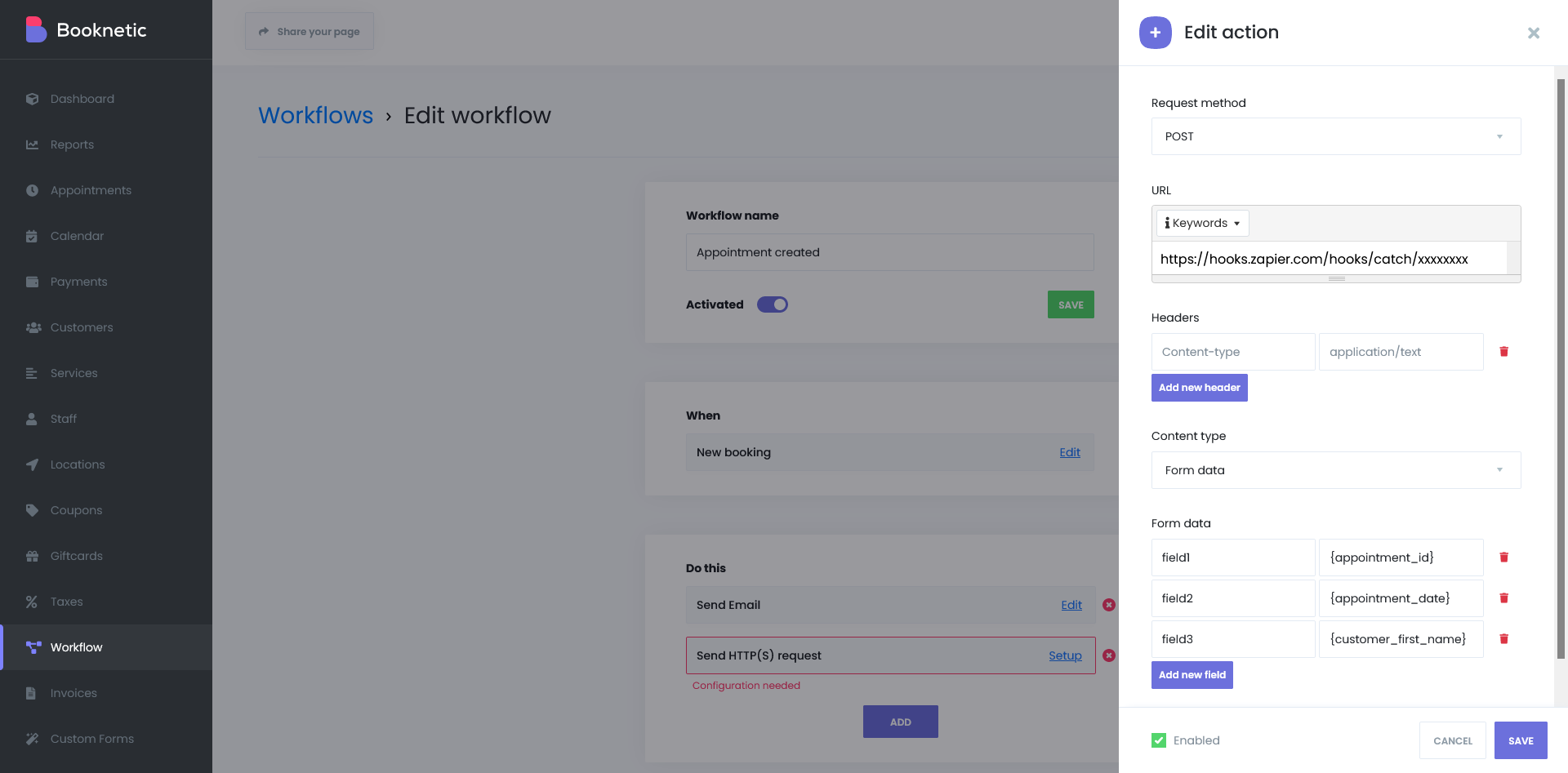
What the webhook add-on does
- Send to any URL. Enter the endpoint, pick GET, POST, PUT or DELETE and the request goes out when the workflow fires. Shortcodes such as {appointment_id} work inside the URL too.
- Shape the payload. Add headers, for example an Authorization header for your API, and send the body as form data or JSON. Every field can hold shortcodes: {customer_name}, {customer_email}, {service_name}, {appointment_date_time}, {staff_name} and dozens more.
- Fire on the right event, at the right time. New booking, reschedule, status change with filters on the old and new status, appointment start or end with an offset, payment received, new customer. For example, a POST one hour after the appointment ends.
- Zapier, Make, IFTTT and more. A catch-hook URL from any of them turns a booking into a row in Google Sheets, a contact in a CRM, a Slack message or an invoice in your accounting tool.
- Save & Test. Send a test request to your endpoint before enabling the workflow and check that the catch hook sees it.
- A record of every call. The workflow log stores the method, URL, headers and body of each request and marks failed attempts, so debugging an integration does not need server logs.
How it works
- In Zapier, Make or IFTTT create a trigger that catches a webhook and copy its URL. For your own system, prepare an endpoint that accepts the request.
- In Booknetic open Workflows, create a workflow with the event you need and add the action Send HTTP(S) request.
- Choose the method, paste the URL, add headers if required and map the fields in form data or JSON using the shortcode picker.
- Click Save & Test, confirm the request arrived, then enable the workflow.
One way, and it needs cron. The webhook pushes booking data out; it does not create bookings from other apps. For that direction use the Booknetic REST API. And since Booknetic 5.9.0 all workflow actions run through the server cron queue, so a cron job every minute is required.
The Zapier integration documentation walks through a complete zap, the workflow logs documentation explains the log, and the REST API documentation covers reading and writing bookings from outside.
Who uses it
- Agencies and consultants pushing every booking into a CRM such as HubSpot or Pipedrive. See legal consultants.
- Clinics logging appointments to a sheet or a patient system without double entry. See health and medical.
- Gyms and studios that post new sign-ups to Slack and add members to a mailing tool. See gym and fitness.
Related features
- Workflows the engine behind every webhook
- Mailchimp integration when the destination is a mailing list
- Conversion tracking for Google Ads and Meta events without a webhook
- Email notifications sent from the same workflow
Frequently asked questions
Does Booknetic integrate with Zapier?
Yes. The Webhook add-on sends an HTTP request to a Zapier catch-hook URL on any workflow event. From there a zap can push the booking into thousands of apps.
Which events can trigger a webhook?
Every workflow event: new booking, reschedule, status change, appointment start or end with a before or after offset, payment received, new customer and events added by other add-ons.
Can I send JSON with a bearer token?
Yes. Choose POST or PUT, set the content type to JSON, write the body with shortcodes and add an Authorization header. Headers and body both accept shortcodes.
Can Zapier create bookings in Booknetic?
Not through the webhook, which only sends data out. Use the Booknetic REST API to create or read bookings from another system.
How do I see whether a request was delivered?
Open the workflow log. Each request is stored with its method, URL, headers and body, and failed attempts are marked.
Which plans include the Webhook add-on?
Premium and Elite. On Basic and Standard it is a separate purchase.


