


Booknetic is a WordPress appointment booking plugin with automated reminders: a message a day before, a text an hour before, a follow-up after the visit. Each one is a workflow with a timed trigger, a channel and a template, and it runs without anyone pressing send.
Reminders are part of the core Workflows module on every plan, with email included free. SMS, WhatsApp and Telegram are add-ons that plug into the same workflows.
- Type
- Core feature (Workflows module), every plan
- Channels
- Email (free add-on), SMS via Twilio or Amazon SNS, WhatsApp, Telegram, in-app and webhook
- Timing
- Before or after "Booking starts" or "Booking ends", in minutes, hours or days
- Filters
- Status, location, service and staff
- Recipients
- Customer, staff member, admin or any address or number
- Requires
- A server cron job running every minute
What automated reminders do
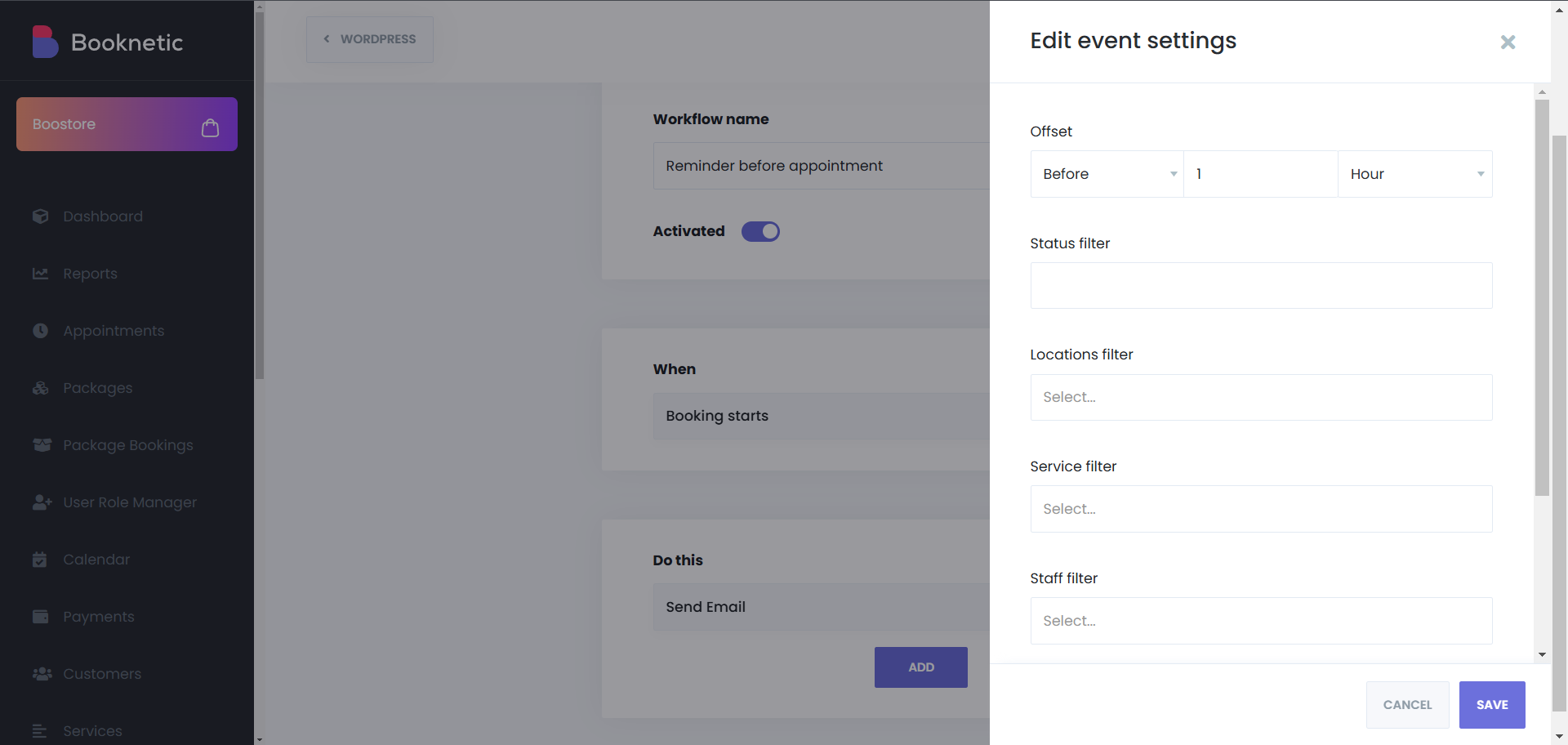
- Reminders before the appointment. Trigger on "Booking starts" with an offset such as 1 day or 2 hours before. One workflow per reminder, each with its own channel and wording.
- Follow-ups after. Trigger on "Booking ends" with an offset after: a thank-you, a review request, an invoice or a rebooking link.
- Staff alerts. Send the same trigger to {staff_email} or {staff_phone} so the team sees the next appointment and its custom form answers.
- Only to the right bookings. Filter by status so cancelled or pending appointments are skipped, and by service, staff or location so a reminder fits the service it is about.
- Any channel, same template logic. Email with HTML and attachments, short SMS and WhatsApp texts, Telegram messages, in-app notices for the admin, or a webhook to another tool.
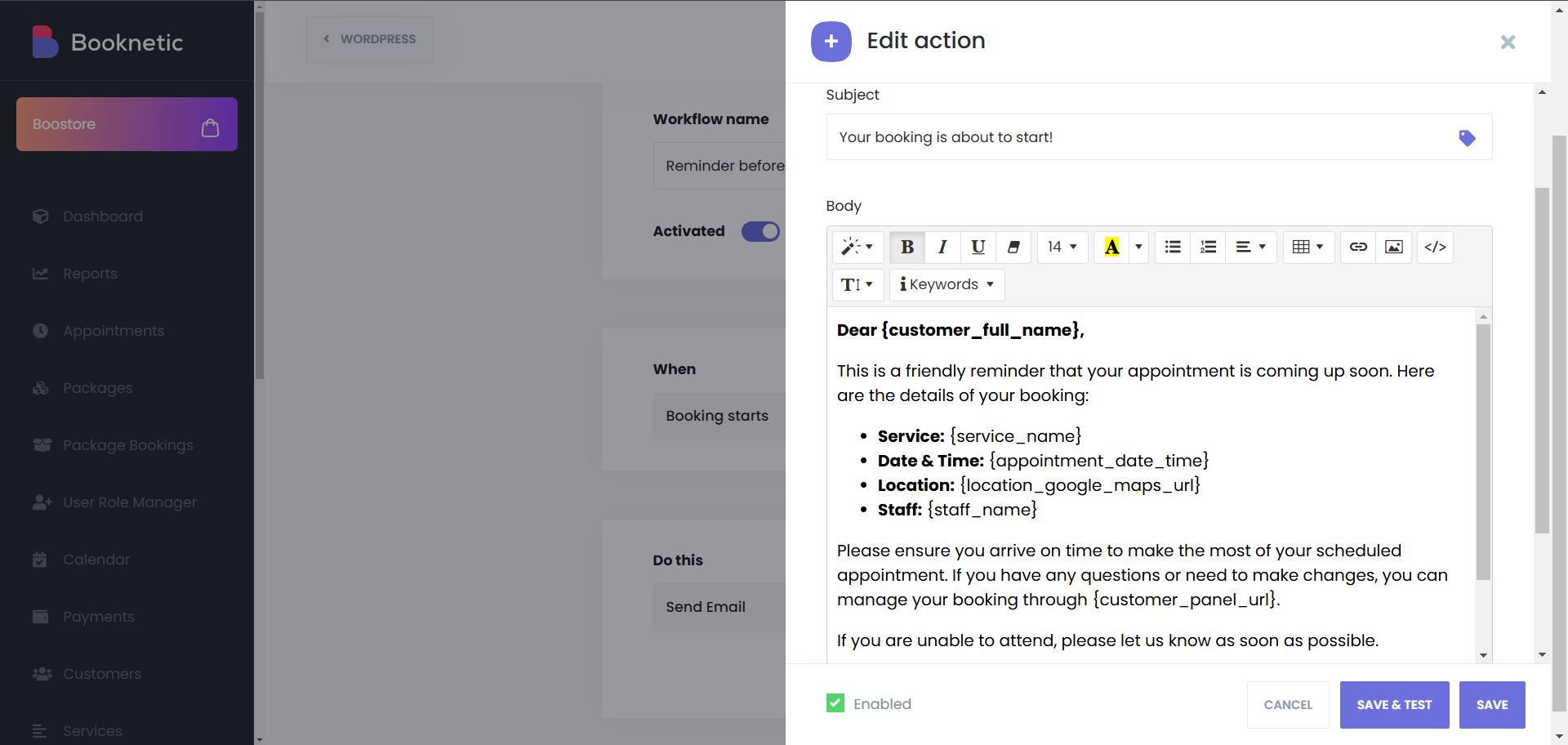
- Personal by shortcode. {customer_full_name}, {service_name}, {appointment_date_time}, {staff_name}, {location_google_maps_url}, {customer_panel_url} and {zoom_join_url} fill in the details.
A reminder schedule that works
| When | Channel | Message |
|---|---|---|
| 1 day before start | Details, address with map link and the customer panel link to reschedule | |
| 2 hours before start | SMS or WhatsApp | Short reminder with time and location |
| 1 hour before start | Email or Telegram to staff | Next customer, service and form answers |
| 1 hour after end | Thank-you with a review request | |
| 30 days after end | Time for the next visit, with a booking link |
How it works
- Open Workflows and create a workflow. Under When choose Booking starts or Booking ends, open its settings and set the offset: Before or After, a number, and minutes, hours or days.
- Add filters for status, location, service or staff if the reminder should not apply to everything.
- Under Do this add an action: Send Email, Send SMS, Send WhatsApp, Send Telegram message or Send HTTP(S) request. Write the template with shortcodes and set the recipients.
- Click Save & Test, check the message, then activate the workflow. The reminder is queued for each matching appointment and sent by cron at the right time.
No cron, no reminders. Timed reminders depend on a real server cron job running every minute. WordPress pseudo-cron only runs when someone visits the site, which makes reminders late or missing. The cron job documentation shows how to add one at common hosts.
The reminders documentation shows the trigger settings, and the cron job documentation covers the server setup.
Who uses it
- Clinics and dentists cutting no-shows with a reminder the day before and a text in the morning. See health and medical.
- Salons and barbershops sending a rebooking nudge a few weeks after the visit. See hairdressers.
- Tutors and coaches delivering the meeting link an hour before an online session. See tutoring.
Related features
- Email notifications, SMS notifications, WhatsApp notifications and Telegram notifications as reminder channels
- Workflows for every trigger and filter
- Email preferences so customers choose which emails they get
- Customer panel linked from the reminder for rescheduling
Frequently asked questions
Can Booknetic send appointment reminders automatically?
Yes. Create a workflow on the "Booking starts" event with an offset such as 1 day before, add an email, SMS, WhatsApp or Telegram action, and it is sent for every matching appointment.
Can I send more than one reminder per appointment?
Yes. Each reminder is its own workflow. Create one for 24 hours before by email and another for 2 hours before by SMS.
Can reminders go to staff as well as customers?
Yes. Set the recipient to {staff_email} or {staff_phone}, or to the admin, in any reminder action.
Which channels are available?
Email is included free. SMS via Twilio or Amazon SNS, WhatsApp via Twilio and Telegram are add-ons. Webhook and in-app notifications are also actions.
Why are my reminders not sent on time?
Almost always the server cron job. Booknetic queues timed actions for cron, so a real cron running every minute is required. The workflow log shows each attempt.
Are reminders an add-on?
No. Timed reminders are part of the Workflows module on every plan. Only the SMS, WhatsApp and Telegram channels are add-ons.


