


Booknetic is a WordPress appointment booking plugin with email notifications for customers, staff and admins, built on its Workflows module. Every email is a workflow action: a trigger, a recipient, a subject and a body with shortcodes, and optional attachments such as the invoice PDF.
Emails go out through WordPress mail, your own SMTP server or Gmail, so deliverability is in your hands rather than a third-party service's.
- Type
- Included in every plan
- Mail gateways
- WordPress Mail, SMTP, or Gmail SMTP with Google sign-in
- Triggers
- Booked, rescheduled, status changed, appointment starts or ends, paid, new customer, password reset and more
- Content
- HTML body with a rich text editor and shortcodes; attachments as files or URLs, including {invoice_pdf}
- Testing
- Save & Test sends the email to any address before the workflow goes live
What email notifications you can send
- Appointment confirmation email. Sent to the customer when the booking is made, with a copy to the staff member or the admin if you want one.
- Reminders before the appointment. One workflow per lead time, for example 24 hours and 1 hour before the start.
- Reschedule and cancellation emails. Triggered when the time or the status changes, with filters on the previous and the new status.
- Payment emails. When an appointment is paid, send the receipt and attach the invoice PDF.
- Account emails. New customer credentials, password reset and forgot-password messages for the customer panel.
- Follow-ups. A thank-you or a review request N minutes after the appointment ends.
An appointment confirmation email template
A confirmation needs the facts and a way to change them. This body works as a starting point; every value in braces is a shortcode Booknetic fills in.
| Part | Example |
|---|---|
| Subject | Your {service_name} appointment on {appointment_date} |
| Opening | Hi {customer_full_name}, your appointment is confirmed. |
| Details | {service_name} with {staff_name} on {appointment_date} at {appointment_start_time}, {location_name}. |
| Payment | Amount: {appointment_price}. Status: {payment_status}. |
| Changes | Need a different time? Open your customer panel: {customer_panel_url} |
| Online session | Join link: {zoom_join_url} |
How it works
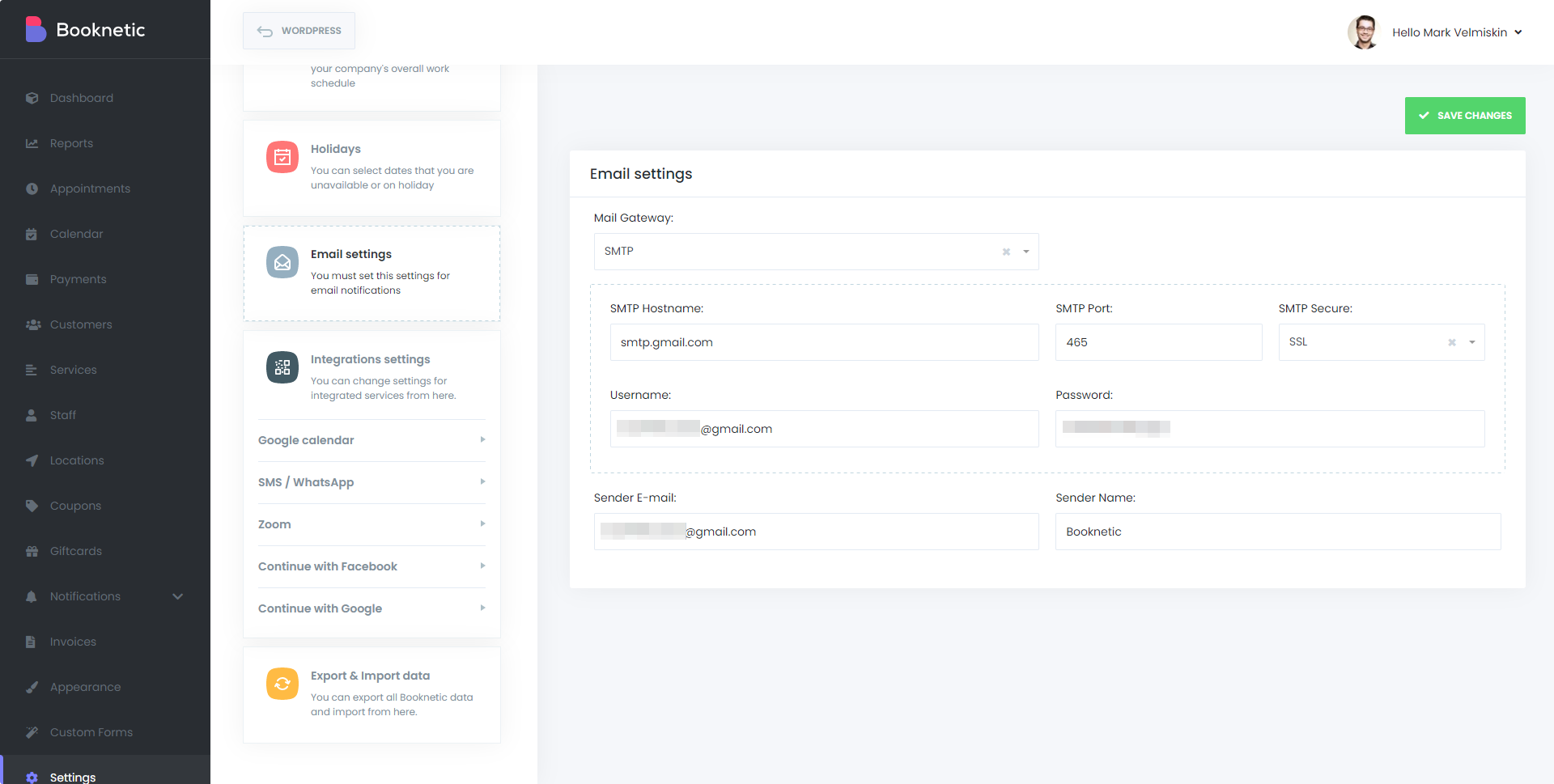
- Pick a mail gateway under Settings > Integrations > Email settings: WordPress Mail for the simplest setup, SMTP with host, port, TLS or SSL and credentials, or Gmail SMTP with a Google sign-in. Set the sender name and address.
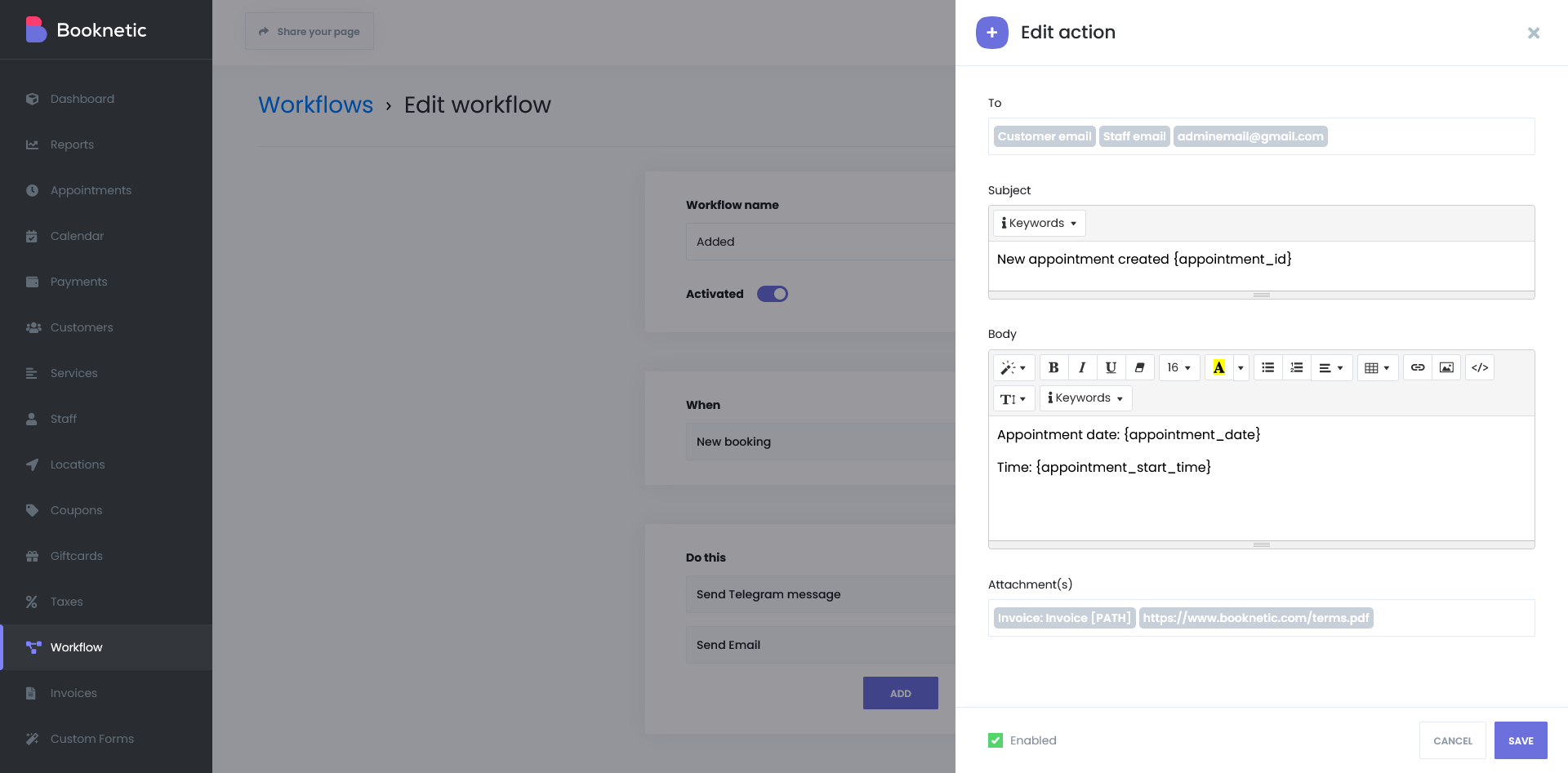
- In Workflows, create a workflow with a trigger, add the Send Email action, and fill in To ({customer_email}, {staff_email} or any address), Subject and Body. The body editor supports HTML and shortcodes.
- Add attachments if needed: a file on the server, a URL, or a shortcode such as {invoice_pdf}. PDF, Word, Excel, CSV, images and archives are supported.
- Click Save & Test, check the email in your inbox, then enable the workflow.
Cron is required. Since Booknetic 5.9.0 every workflow action, including the instant booking confirmation, is processed through a server cron queue. Without a real server cron job running every minute, emails are not sent. The documentation shows how to add one on common hosts.
The email notifications documentation and the workflows documentation list every trigger and shortcode.
Who uses it
- Every business that confirms bookings by email; it is the baseline notification channel on all plans.
- Clinics and consultants attaching intake forms or invoices to the confirmation. See health and medical.
- Photographers and event planners sending a preparation checklist before the session. See photographers.
Related features
- SMS notifications and WhatsApp notifications for the messages people read faster
- Workflows for triggers, filters and multi-step automations
- Invoices to attach as PDF
- Email preferences so customers choose what they receive
Frequently asked questions
Does Booknetic send an appointment confirmation email automatically?
Yes, once you create a workflow on the "appointment is booked" trigger with a Send Email action. Default workflows can be created in Settings and edited to your wording.
Can I send reminders 24 hours and 1 hour before?
Yes. Use the "appointment starts" trigger with a lead time; one workflow per reminder, each with its own subject and body.
Which mail gateways are supported?
WordPress Mail, SMTP (any provider, TLS or SSL) and Gmail SMTP with Google authorisation.
Can I attach the invoice or a PDF?
Yes. The Send Email action accepts attachments as a server file path, a URL or a shortcode such as {invoice_pdf}. Supported types include PDF, DOC, DOCX, XLS, XLSX, CSV, images and ZIP.
Why are my emails not being sent?
Most often the server cron job is missing. Booknetic queues every workflow action for cron, so a real cron running every minute is required. The workflow log shows each attempt and any gateway error.
Are email notifications an add-on?
No. Email notifications and the Workflows module are included in every Booknetic plan.


