


Booknetic works as a Divi appointment booking plugin: with Booknetic and Divi both active, the Divi Builder lists Booknetic modules next to its own. Drop the Booking Panel module into a row, choose what the form should show, and publish.
There is no shortcode to paste and no code to write. The modules are part of the core plugin, and the same booking form is available for Gutenberg and Elementor.
- Type
- Core feature, every plan
- Modules
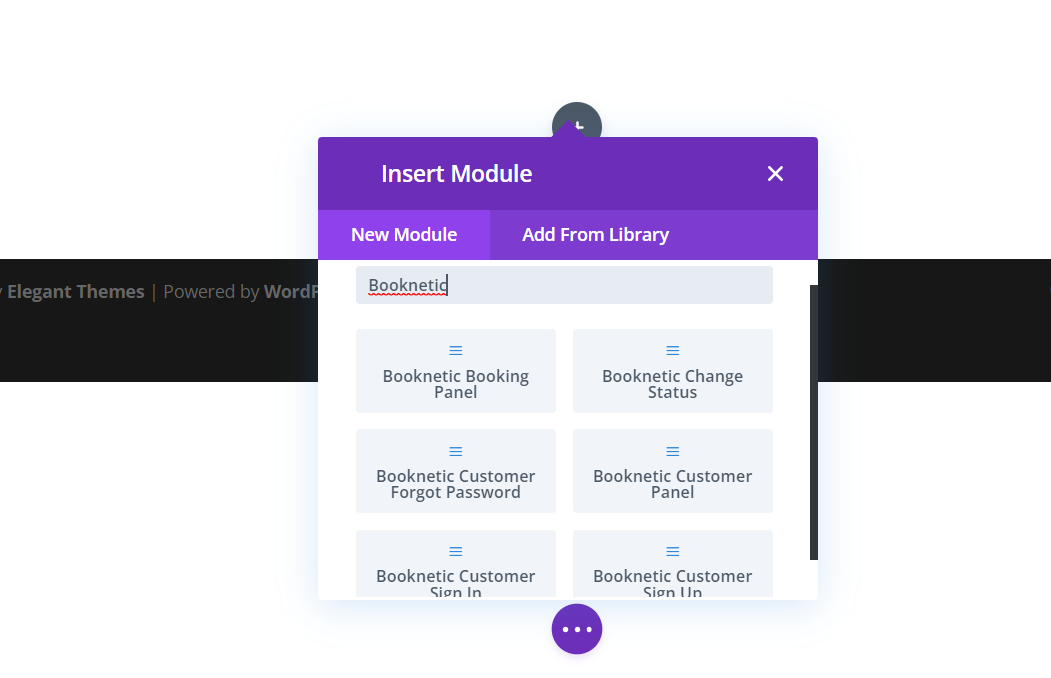
- Booking Panel, Booking Popup button, Customer Sign In, Sign Up, Forgot Password and Change Status; a Customer Panel module comes with that add-on
- Module options
- Show the full form, or limit it to a category, service, staff member or location
- Also for
- Gutenberg blocks and Elementor widgets with the same options
- Styling
- Booknetic themes from the Appearance module; Divi design settings style the wrapper
What the Divi integration does
- Booking Panel module. The full booking form inside a Divi row. Pick the theme and optionally a category, service, staff member or location, so a page can show one service or one person only.
- Booking Popup button. A button module that opens the booking form in a modal, for a "Book now" call to action in a hero section or a footer.
- Customer modules. Sign In, Sign Up and Forgot Password modules for the customer account pages, and a Customer Panel module when the Customer Panel add-on is installed.
- Change Status module. The page behind the approve and cancel links in your notifications, built in Divi like the rest of the site.
- Visual Builder preview. The modules render in the Divi Visual Builder, so you see the form in place while you lay out the page.
- Same options everywhere. Gutenberg blocks, Elementor widgets and the shortcode share the same filters, so a site can mix builders without different setups.
How it works
- Install and activate Booknetic and Divi (the theme or the Divi Builder plugin).
- Edit a page with the Divi Builder, add a row and click the plus button. Search for "Booknetic" to list the modules.
- Add the Booking Panel module and choose the theme and the category, service, staff or location filter in the module settings.
- Save or publish. The booking form appears on the page with the theme you set under Booknetic > Appearance.
Colors and fonts come from Booknetic, not from Divi. The module settings choose which theme the form uses; the theme itself (colors, font, panel height, custom CSS) is edited under Booknetic > Appearance. Divi design settings apply to the module wrapper around the form.
For other page builders see the booking block documentation for Gutenberg and the popup booking panel documentation for the button.
Who uses it
- Agencies building client sites on Divi that need a booking page without leaving the builder. See spa and salons.
- Consultants and coaches with a Divi landing page per service and a preselected form on each. See legal consultants.
- Photographers and creative studios whose Divi portfolio ends with a booking section. See photographers.
Related features
- Fully customizable booking widget for themes, steps and shortcode parameters
- Customer panel with its own Divi module
- Multiple locations for a Divi page per branch
- Booking Step Builder to add your own steps to the form
Frequently asked questions
Does Booknetic work with Divi?
Yes. Booknetic registers its own modules in the Divi Builder: Booking Panel, Booking Popup button, Customer Sign In, Sign Up, Forgot Password and Change Status. No shortcode is needed.
Can I show one service or one staff member in the Divi module?
Yes. The Booking Panel module has filters for category, service, staff and location, so each page can show a narrowed form.
Can I open the booking form in a popup from a Divi button?
Yes. Use the Booking Popup button module. It opens the booking form in a modal on click.
How do I change the colors of the form in Divi?
Under Booknetic > Appearance. Choose or create a theme with your colors, font and panel height, then select that theme in the module settings.
Does it work with Elementor and Gutenberg too?
Yes. Booknetic ships Gutenberg blocks and Elementor widgets with the same options, plus the [booknetic] shortcode for any other builder.
Is the Divi integration an add-on?
No. The Divi, Elementor and Gutenberg integrations are part of the core plugin on every plan.


