


Booknetic is a WordPress appointment booking plugin with recurring appointments: one booking that repeats daily, weekly or monthly. A customer books a weekly lesson or a monthly check-up once, reviews the list of dates and pays for all of them or for the first one only.
Recurring is switched on per service, so a one-off consultation stays a single booking while a course of sessions repeats.
- Type
- Core feature, every plan
- Repeat types
- Daily every N days, weekly on chosen weekdays, monthly on a date or on the first to last weekday
- Customer edits
- Each generated date and time can be changed before confirming
- Payment
- Pay for all appointments now, or pay the first and the rest over time
- Limits
- Fixed full period and fixed frequency settings per service
What recurring booking does
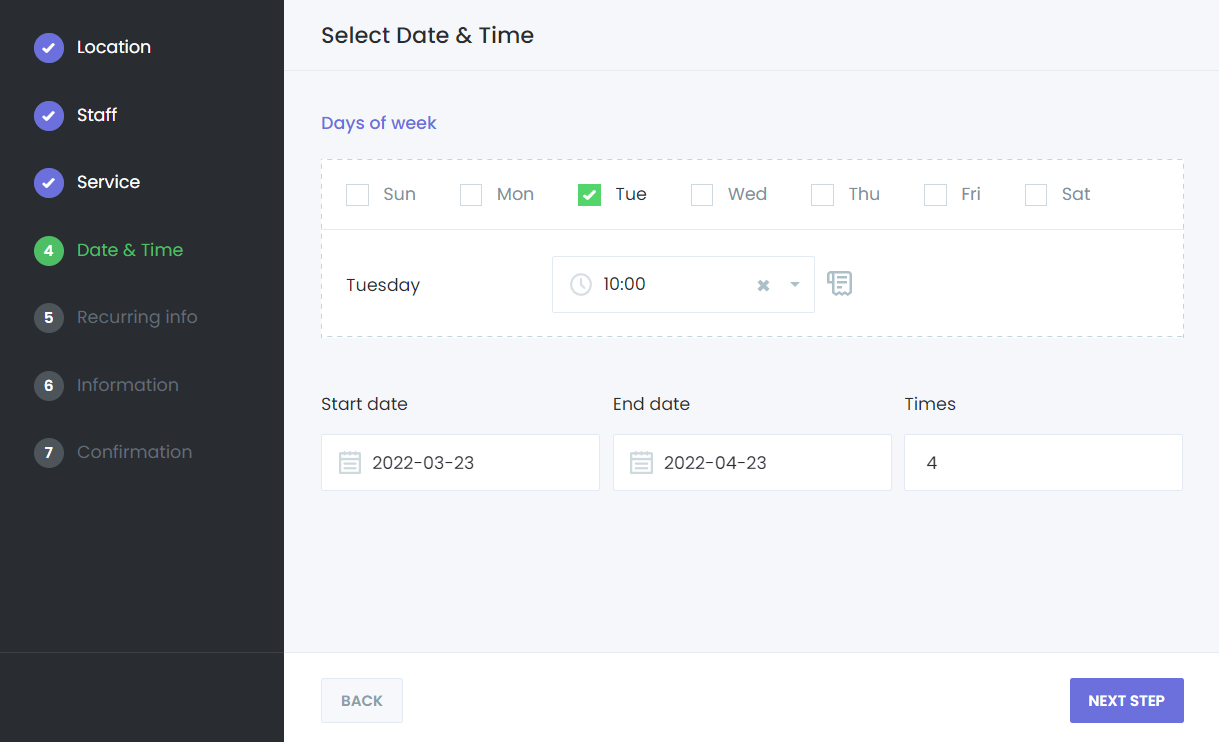
- Daily, weekly or monthly. Daily repeats every N days between a start and an end date. Weekly lets the customer tick weekdays and set a time for each, with a Copy to All button. Monthly takes a day of the month or a rule such as "second Tuesday".
- A reviewable list. After the choices, the Recurring Information step lists every generated appointment with its date and time. The customer can edit a single row, and dates that are not available are skipped automatically.
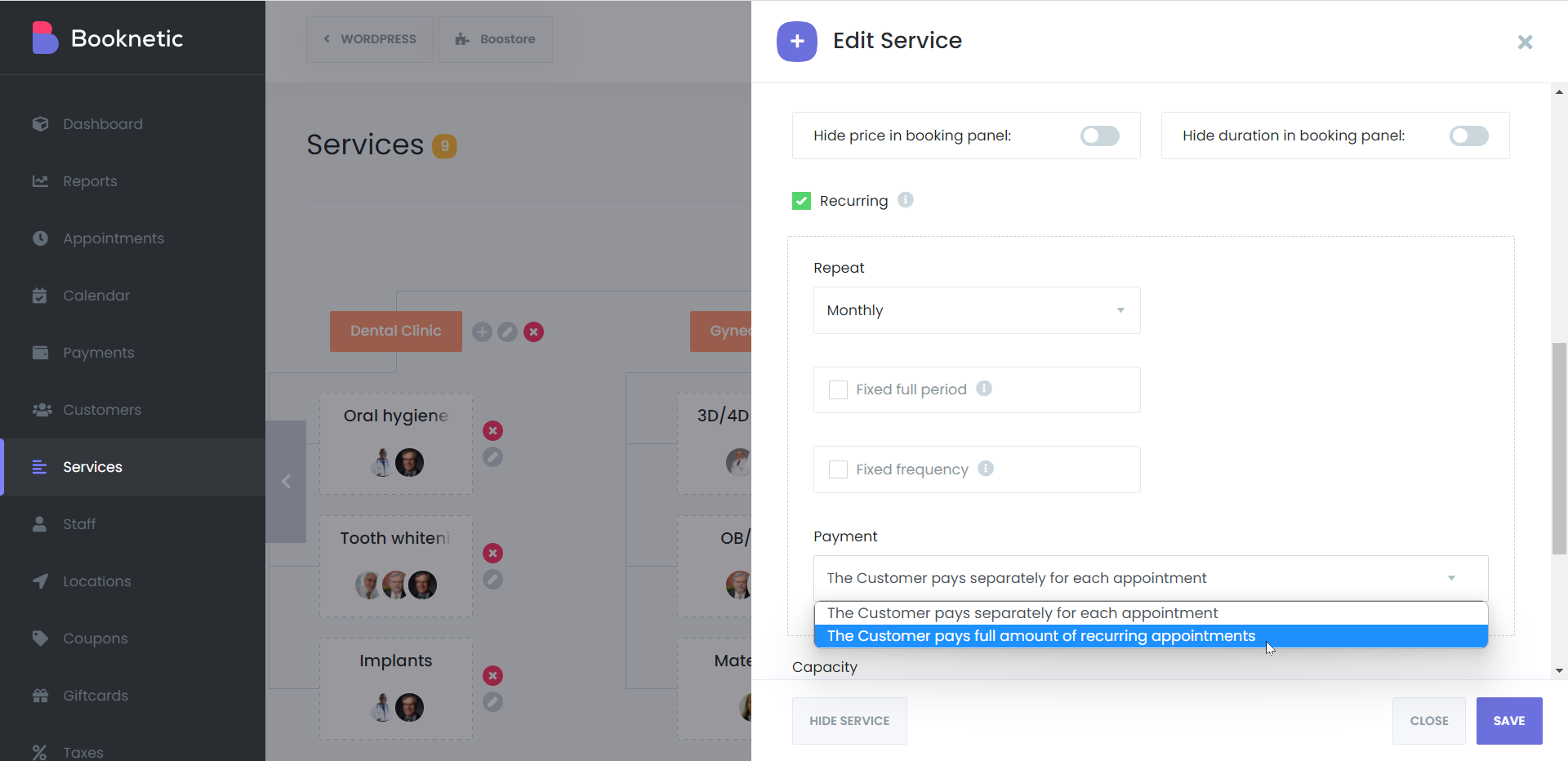
- Two payment modes. Per service, choose whether the customer pays the full amount of all recurring appointments now or pays separately for each appointment.
- Fixed period and frequency. Lock the full period, for example a whole month, or fix how many times per week a service can repeat, so customers follow the plan you sell.
- Each occurrence is a real appointment. Every date shows in the calendar, can be rescheduled or cancelled on its own, and triggers the same workflows and reminders as any other booking.
- Shortcodes for the series. Use {recurring_appointments_date_time} and {appointments_total_price} in confirmations to list all dates and the total.
How it works
- Open the service, tick Recurring and choose the repeat type. Optionally enable Fixed full period or Fixed frequency.
- Pick the payment type: the customer pays the full amount of the recurring appointments, or pays separately for each appointment.
- On the booking form the customer picks the first date and time, then the repeat settings appear with a start and end date.
- The Recurring Information step shows the full list. The customer adjusts any row, confirms and pays. Each appointment then appears in your calendar.
Recurring services cannot go into packages or the "as soon as possible" shortcut. The Date & Time step is always shown for a recurring service, and the Packages add-on accepts non-recurring services only.
The recurring appointments documentation shows the service settings and each repeat type from the customer side.
Who uses it
- Tutors and music teachers booking a term of weekly lessons in one go. See tutoring.
- Gyms and personal trainers with sessions three times a week at fixed times. See gym and fitness.
- Physiotherapists and nutritionists who schedule a course of follow-ups at the first visit. See nutritionists.
Related features
- Service packages when the customer should choose each date later instead
- Group appointments for classes with several attendees per slot
- Deposit payments to take part of the price upfront
- Reminders sent before every occurrence
Frequently asked questions
Does Booknetic support recurring appointments?
Yes, on every plan. Turn on Recurring for a service and customers can book it daily, weekly or monthly in one booking.
Can the customer change one date in the series?
Yes. The Recurring Information step lists all generated appointments and each row can be edited before confirming. After booking, each appointment can be rescheduled on its own.
How is a recurring booking paid?
Per service you choose: the customer pays the full amount of all appointments at once, or pays separately for each appointment.
What happens when one of the dates is not available?
Dates that fall on a holiday, a day off or a taken slot are skipped automatically, and the customer sees the final list before confirming.
Can I limit how often a service repeats?
Yes. Fixed full period locks the whole period, and Fixed frequency limits the number of times per day, week or month.
Do reminders go out for every occurrence?
Yes. Each appointment in the series is a normal appointment, so workflows and reminders run for each one.


