


Booknetic is a WordPress booking plugin with deposit payments: set a deposit per service, per staff member or site-wide, and the customer pays that part online when booking. The rest is paid later, in the customer panel or at the visit.
Deposits cut no-shows without asking for full prepayment on services people hesitate to pay for up front.
- Type
- Core feature, no add-on needed
- Included in
- All plans
- Deposit value
- Fixed amount or percentage, per service, per staff price, or a global default
- Customer choice
- Deposit by default; let customers pay the full amount instead with one setting
- Collected through
- Any online gateway: Stripe, PayPal, WooCommerce, Square, Razorpay, Mollie and others
How deposit payments work
- Set the deposit where it belongs. On the service as a percentage or a fixed amount, on a staff member's specific price, or once for the whole site under Settings > General > Advanced.
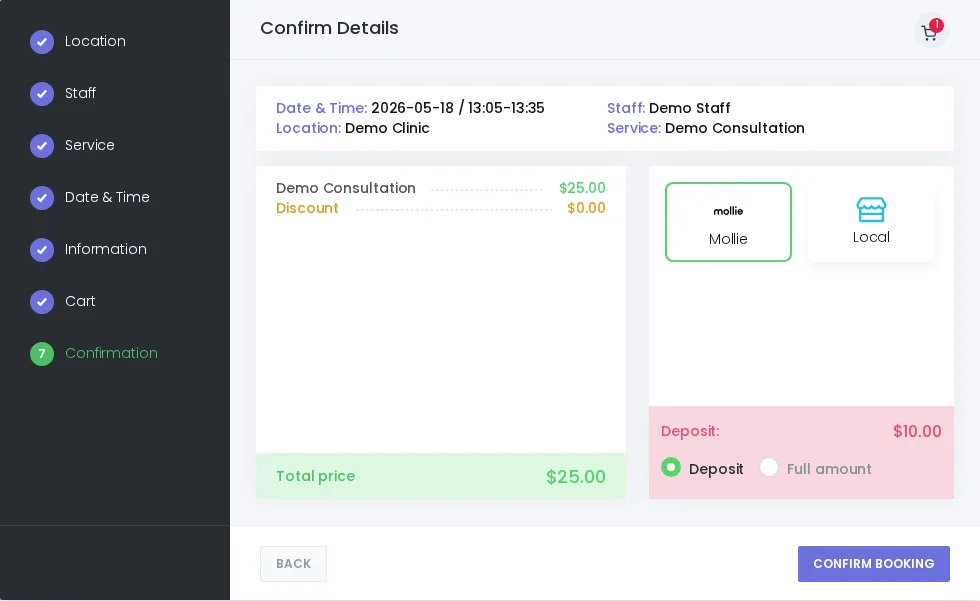
- The customer sees both numbers. The confirmation step shows the total and the deposit. With "Customer can pay full amount" on, radio buttons let them choose deposit or full price, deposit preselected.
- Pay online, status follows the result. The deposit goes through the chosen gateway, and the appointment gets the status you mapped to a successful or a failed payment.
- Collect the rest later. The open balance shows in the admin and, if you use the Customer Panel, a Pay now button lets the customer settle it before the visit.
- Local payment skips deposits. When the customer picks "pay at the venue", the deposit choice is hidden and the full amount is due on site.
Setting it up
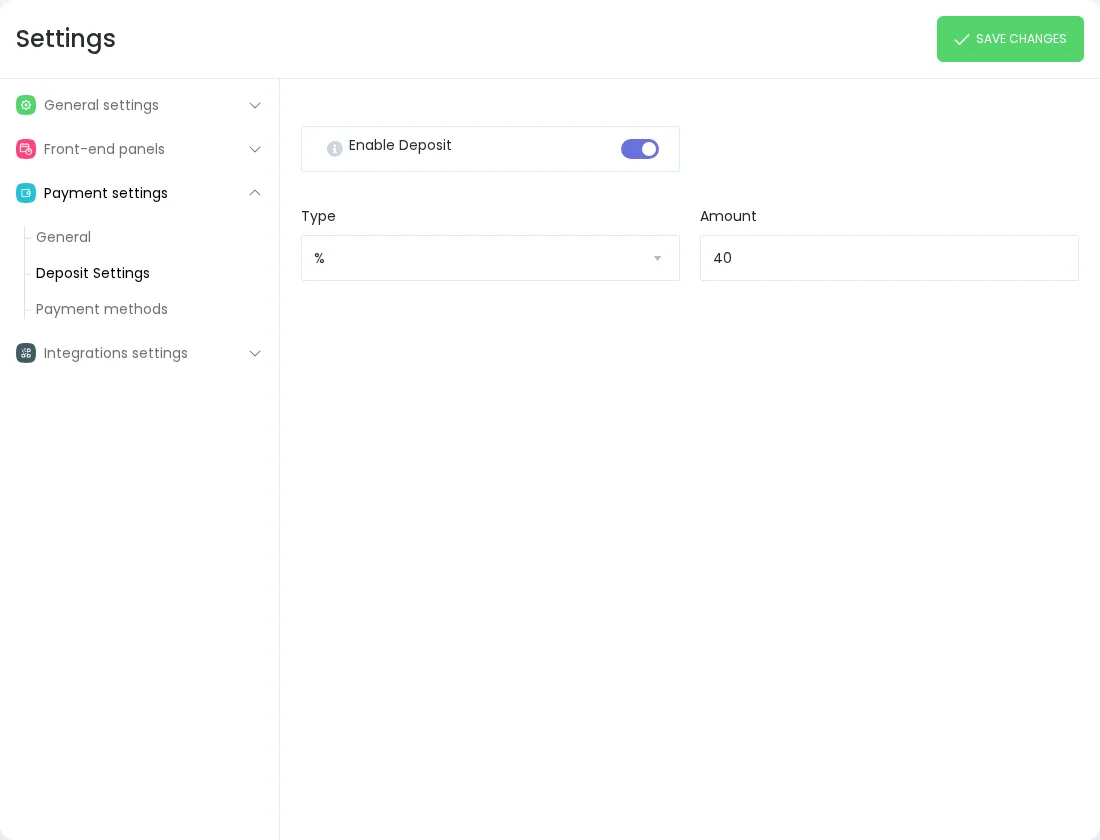
- Open the service, turn on Enable deposit and enter the value and the unit (percent or currency). Staff with a specific price can have their own deposit.
- Or set a site-wide default under Settings > General > Advanced > Enable Global Deposit.
- Under Payments, decide whether customers may pay the full amount instead, and which statuses an appointment gets after a successful or a failed payment.
- Connect at least one online gateway so the deposit can be collected at booking.
What it is not. Deposit Payments is a one-off appointment deposit. It is not a subscription, an instalment plan or an automatic charge of the remaining balance. The remainder is paid by the customer in the panel or by you at the visit.
Who uses it
- Tattoo studios, salons and spas protecting long slots from last-minute cancellations. See spa and salons.
- Photographers and event planners taking a booking fee for a session and the balance on delivery. See photographers.
- Repair centres and tutors charging a diagnostic or a first-lesson deposit. See repair centres and tutoring.
Related features
- Stripe payments, PayPal and WooCommerce payments to collect the deposit
- Customer Panel where the remaining balance is paid
- Payment links to request the balance by message
- Coupons that apply before the deposit is calculated
Frequently asked questions
Can I set a different deposit for each service?
Yes. Each service has its own Enable deposit switch with a fixed or percentage value, and a staff member with a specific price can carry a specific deposit. A global deposit covers services that have none of their own.
Can the customer pay the full amount instead of the deposit?
Yes, when the "Customer can pay full amount" setting is on. The confirmation step then shows a deposit or full amount choice, with deposit preselected.
How is the remaining balance collected?
In the Customer Panel with the Pay now button, with a payment link you send, or at the visit. Booknetic does not charge the remainder automatically.
Does local payment collect a deposit?
No. Local payment is an offline option, so the deposit choice is hidden and the whole amount is paid at the venue.
Is Deposit Payments an add-on?
No. Deposits are part of the core plugin and available on every plan. You need at least one online payment gateway connected to collect them.
Which payment gateways can take the deposit?
Any online gateway Booknetic supports, including Stripe, PayPal, WooCommerce, Square, Razorpay, Mollie, Mercado Pago, 2Checkout, Vipps and Netopia.


