


Booknetic is a WordPress booking plugin with service packages: bundles such as 10 massages plus 5 yoga sessions sold at one price. The customer buys the package once, then books each session when it suits them, and Booknetic keeps count.
Packages sit on the Service step of the booking form next to single services, with the old price struck through, the package price and the list of what is inside.
- Type
- Add-on (Packages)
- Included in
- Elite plan; sold separately on Basic, Standard and Premium
- Package contents
- Any mix of non-recurring services with a quantity for each
- Price
- You set the total; the discount against the single-service sum is calculated for you
- Expiry
- Optional, in days, weeks, months or years from purchase
- Booking sessions
- From the Packages tab of the customer panel, or by an admin on the customer's behalf
What the Packages add-on does
- Bundle services with quantities. Pick the services, set how many sessions of each the package contains and give it a name, an image and a description. A package can be limited to certain locations.
- One price, a visible discount. The Price tab shows the sum of the services and you type the package total. The difference is shown as the discount on the package card.
- Sell it in the booking form. Public packages appear on the Service step. The customer selects one, enters their details, pays and lands on a Finish step where they can schedule the first sessions right away.
- Sessions booked over time. In the customer panel, the Packages tab shows a progress bar such as "3/5 booked" and a "Schedule now" button for each remaining slot. The service is preselected; the customer picks staff and time.
- Private packages. Mark a package private and only staff or admins can book it for a customer, for deals you quote in person.
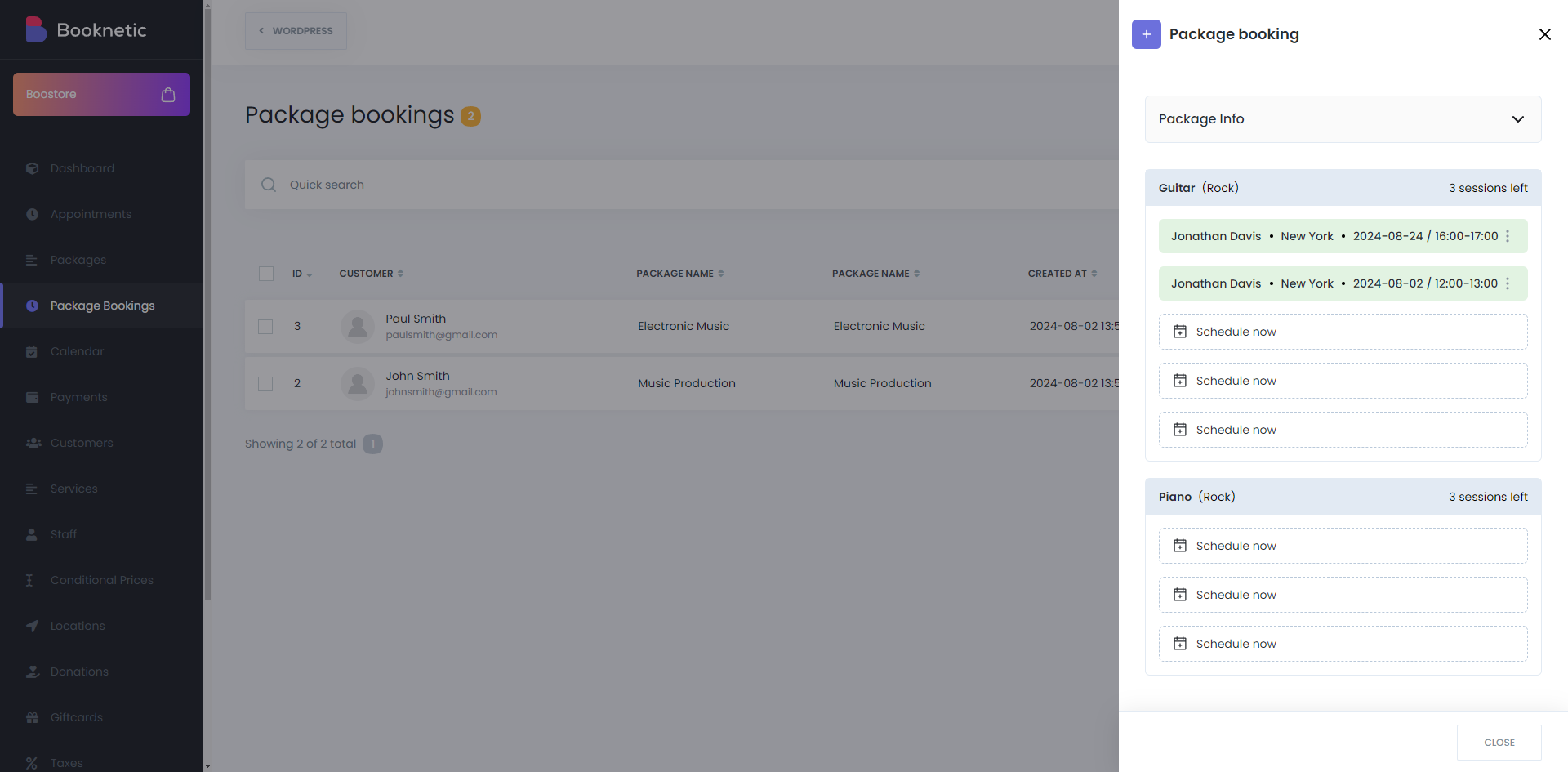
- Admin control. Package Bookings lists every purchase with its status and progress. Edit the paid amount or payment status, view the booked sessions, or create a package booking for a walk-in customer.
How it works
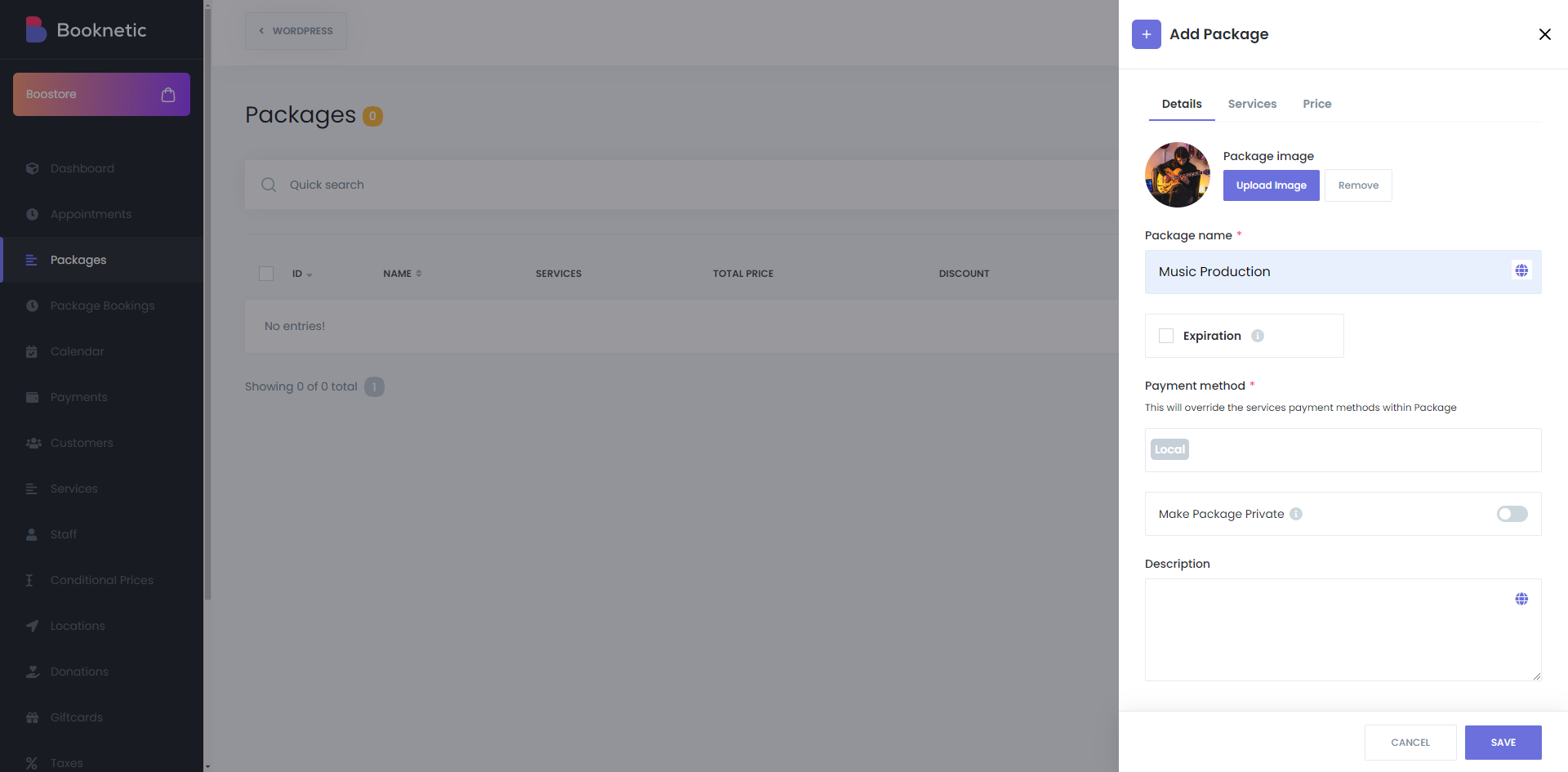
- Open Packages in the Booknetic menu and click Add Package. Fill in the Details tab: name, image, optional expiration, allowed payment methods and locations.
- On the Services tab pick the services and set the number of sessions for each. On the Price tab enter the total price.
- The customer buys the package from the booking form and pays online or by local payment. Until a package is paid, no sessions can be booked from it.
- The customer books each session from the Packages tab in the customer panel, or an admin books it from Package Bookings. A deleted session returns its slot to the package.
- Use the "Package booking created" workflow trigger with shortcodes such as {package_name}, {package_services} and {package_booking_expires_on} to send a confirmation.
Single service per session. Package sessions are booked one at a time, so the Cart step is not used for them, and recurring services cannot be put inside a package. The customer and the services of a sold package cannot be changed afterwards.
The Packages documentation walks through the admin screens and the customer panel tab.
Who uses it
- Gyms and personal trainers selling 10-session blocks at a better rate than single sessions. See gym and fitness.
- Spas and massage studios with treatment courses, for example six sessions to be used within three months. See spa and salons.
- Tutors and music teachers who sell a term of lessons upfront and let the student book each lesson. See tutoring.
Related features
- Customer panel where customers manage and schedule their package sessions
- Gift cards and coupons for other ways to discount
- Loyalty points to reward repeat customers
- Recurring appointments when the sessions follow a fixed schedule instead
Frequently asked questions
Can I sell session packages with Booknetic?
Yes. The Packages add-on bundles services with a quantity each at a single price. The customer buys the package from the booking form and books the sessions later from the customer panel.
How does the customer book the sessions in a package?
In the customer panel, under the Packages tab, each remaining session has a "Schedule now" button that opens the booking form with the service preselected. An admin can also book a session from Package Bookings.
Can a package expire?
Yes. Turn on Expiration on the package and set a period in days, weeks, months or years. Expired packages show as expired in the customer panel.
Can a package include different services?
Yes. Any mix of non-recurring services, each with its own session count, for example three massages and two yoga classes.
What happens if a package is not paid?
The customer sees a "Pay now" button in the customer panel and sessions cannot be booked until the payment goes through. An admin can also mark it paid under Package Bookings.
Which plans include the Packages add-on?
Elite. On Basic, Standard and Premium it is a separate purchase.


