


Don’t let a "one-price-fits-all" model limit your growth. With the Conditional Prices add-on, your booking system becomes a smart revenue engine that adjusts rates automatically based on demand, loyalty, and timing.
Why Successful Businesses Choose Conditional Prices
Managing a busy schedule is hard; pricing it correctly shouldn't be. Whether you're a salon, a medical clinic, or a law firm, this feature gives you the "Big Tech" advantage of dynamic pricing without the manual headache.
Maximize Peak Hours: High demand deserves higher margins. Automatically apply surcharges for weekends, holidays, or popular time slots to capture the true value of your time.
Fill the Gaps: Don’t let empty slots go to waste. Incentivize last-minute bookings with "Flash Discounts" that trigger automatically as the appointment time approaches.
Reward What Matters: Build long-term loyalty without the paperwork. Offer exclusive rates for your most frequent clients or apply group discounts to secure larger bookings instantly.
Protect Your Margins: Offset rising costs by applying small surcharges for premium staff members or high-fee payment methods, ensuring every booking is profitable.
Set and Forget: Spend less time on math and more time on your craft. Once your rules are set, Booknetic handles every calculation behind the scenes, 24/7.
Infinite Possibilities: 16+ Smart Triggers
Our advanced logic engine watches every booking in real-time. You set the rules, and Booknetic does the math.
Time & Urgency
Rush Booking Fees: Add a surcharge for appointments booked within 24 hours to cover the cost of short-notice scheduling.
Early Bird Specials: Reward those who plan ahead by offering a percentage off for bookings made weeks in advance.
Seasonal Shifts: Adjust your entire price list for peak months like December or July with a single automated rule.
Flash Sales: Use the Remaining Minutes trigger to offer extreme discounts for the next hour to fill immediate gaps.
Weekday Pricing: Automatically apply weekend surcharges or "Slow Tuesday" discounts to balance your weekly traffic.
Customer-Centric Pricing
Loyalty Levels: Automatically apply a "Thank You" discount for customers on their 10th visit using the total appointment count.
VIP Categories: Assign exclusive rates to different customer segments like "Members," "Students," or "Corporate Partners."
Group Incentives: Lower the price-per-person as the "Brought People Count" increases, making group bookings more attractive.
Bulk Booking Rewards: Apply instant discounts when a customer adds multiple appointments to their cart in a single session.
Precision Control
Staff-Based Rates: Set higher prices for your Senior Specialists and standard rates for Juniors without duplicating services.
Location Flexibility: Adjust pricing based on the cost of doing business in different branches or premium city centers.
Payment Incentives: Offer a small discount for low-fee payment methods like Bank Transfers to protect your margins.
Service-Specific Logic: Differentiate pricing between "Basic" and "Premium" versions of the same service category automatically.
Hyper-Personalized Form Logic
Custom Form Choices: Trigger price changes based on specific answers or selections made within your custom booking forms.
Numeric Inputs: Automatically calculate surcharges based on numeric values provided by the client (e.g., "Number of Rooms" or "Square Footage").
Preference Selections: Use radio buttons or dropdowns to add costs for specific client requirements or equipment needs.
Deposit Adjustments: Offer a "Full-Pay" discount for clients who pay 100% upfront versus those only paying a deposit.
Real-World Success Stories
The "Tiered Specialist" Strategy (Medical & Professional Services)
Goal: Direct more traffic to junior staff while maximizing profit from high-demand specialists.
The Problem: The Senior Partner is always overbooked, while junior associates have empty slots.
The Rule: If Staff = "Senior Partner" → 30% Addition (Service Price).
The Result: High-value clients pay a premium for expertise, while price-sensitive clients fill the junior staff’s calendars, balancing the firm's workload and increasing overall margins.
The "Happy Hour" Filler (Wellness & Beauty)
Goal: Drive bookings during historically slow mid-week afternoons.
The Problem: The spa is empty every Tuesday and Wednesday between 1:00 PM and 4:00 PM.
The Rule: If Week Day = Tuesday OR Wednesday AND Start Time < 16:00 → 20% Discount.
The Result: The spa successfully "fills the gaps" in their schedule, ensuring staff are paid and utilities are covered during otherwise dead hours.
The "Emergency Response" Premium (Home Services & Repairs)
Goal: Charge a fair price for the disruption caused by urgent, last-minute requests.
The Problem: Clients call for "emergency" plumbing repairs that require rescheduling other tasks.
The Rule: If Remaining Hours to Appointment < 4 → $50 Fixed Addition.
The Result: The business earns an "Urgency Fee" that compensates for the logistical headache of a 911-style service call.
The "Bulk Learning" Incentive (Education & Coaching)
Goal: Increase the "Average Order Value" by encouraging clients to book more at once.
The Problem: Students book one session at a time, making long-term revenue unpredictable.
The Rule: If Cart Appointments Count > 5 → 15% Discount (Appointment Sum Price).
The Result: Students are incentivized to commit to a full month of tutoring upfront, securing guaranteed revenue for the tutor and a better deal for the student.
The "Large Party" Efficiency (Events & Tours)
Goal: Make large group bookings more attractive and easier to manage.
The Problem: A city tour is more profitable when the bus is full, but groups are hard to convert.
The Rule: If Brought People Count > 4 → $10 Discount per person.
The Result: A family of 5 sees an instant $50 saving at checkout, making them much more likely to choose your tour over a competitor’s.
The "Smart Checkout" Optimization (All Businesses)
Goal: Protect profit margins from high credit card processing fees.
The Problem: Credit card processors take 3% of every transaction, eating into small business profits.
The Rule: If Payment Method = "Bank Transfer" or "Local Pickup" → 3% Discount.
The Result: Customers are nudged toward lower-cost payment methods, saving the business thousands in annual transaction fees.
The "Seasonal Surge" (Tourism & Photography)
Goal: Capitalize on high-demand holiday seasons.
The Problem: Every client wants their family portraits taken in December, but the photographer has limited slots.
The Rule: If Month = December → 25% Addition.
The Result: The photographer captures the "market value" of the peak season, earning enough in one month to sustain the business through the slower winter months.
Pro-Level Logic, Zero Coding Required
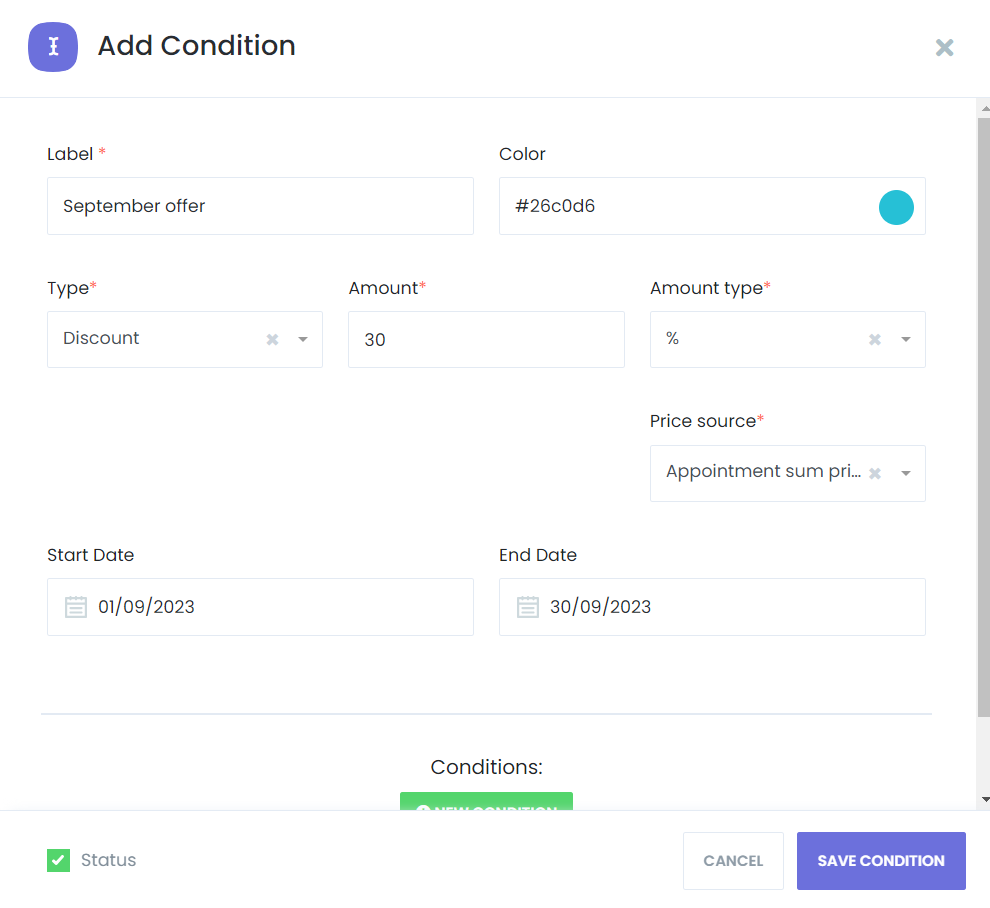
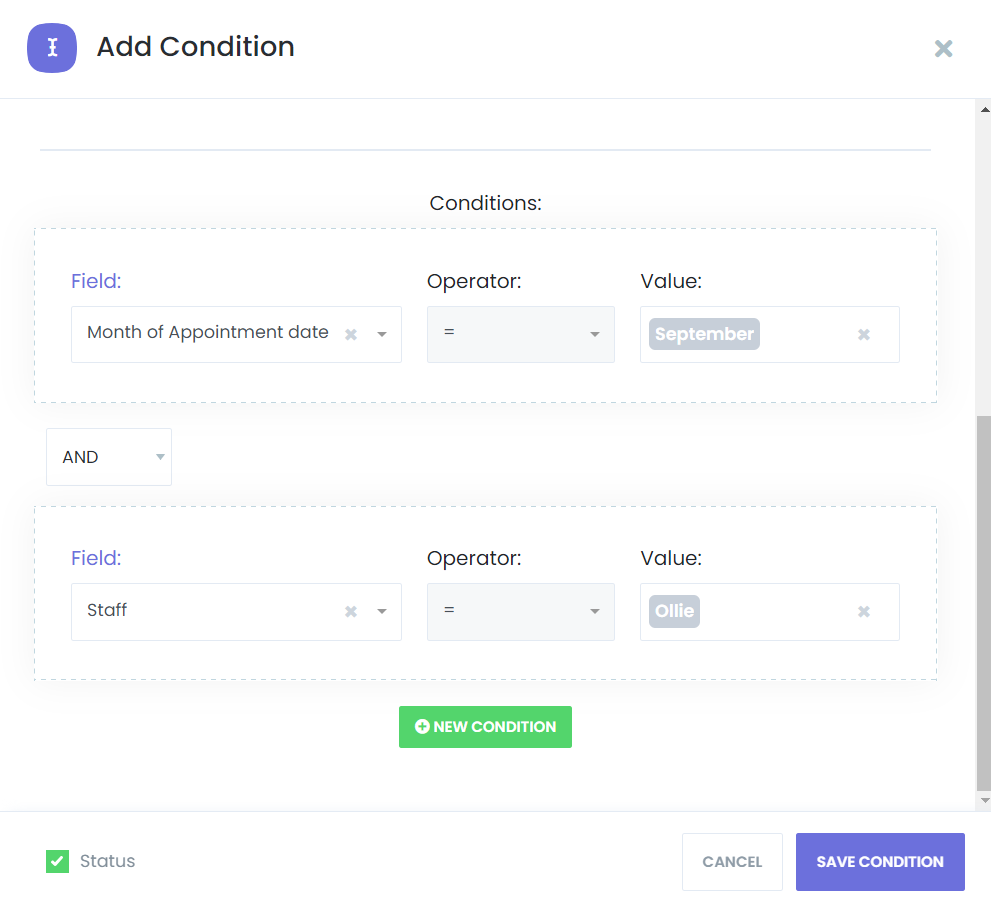
You don't need to be a developer to build complex pricing strategies. Our intuitive interface uses simple "If This, Then That" logic.
Select your trigger (e.g., Staff, Date, or Customer History).
Set your operator (e.g., "Is Greater Than" or "In List").
Define your adjustment (Fixed amount or Percentage).
❓ Frequently Asked Questions
Do I need to be a developer to set up these rules?
Not at all. The Conditional Prices add-on is designed with a "No-Code" philosophy. If you can fill out a simple form, you can create a pricing rule. We use a straightforward "If This, Then That" interface where you simply select your criteria from a dropdown menu and enter your price adjustment.
What happens if a customer meets two different rules at once?
By default, the rules stack. For example, if you have a "Weekend Surcharge" of $10 and a "Senior Specialist" surcharge of 10%, both will be applied to the final price. This allows you to create highly sophisticated pricing strategies that reflect the true value of the appointment.
Can I set rules to run only during specific dates (like a Black Friday sale)?
Yes. Every rule has an optional "Campaign Duration" setting. You can set a start and end date so your promotional pricing or seasonal surcharges turn on and off automatically without you having to lift a finger.
Can I base pricing on custom questions I ask in my booking form?
Absolutely. This is one of our most powerful features. You can trigger price changes based on Custom Form Choices.
Example: If you ask "How many rooms need cleaning?" in a custom field, the price can automatically increase based on the number the customer enters.
Will my customers see the price change?
Yes. The price updates dynamically in real-time as the customer fills out the booking form. This transparency builds trust and ensures there are no "hidden fees" or surprises when they reach the final checkout step.
Can I temporarily disable a rule without deleting it?
Yes. Every rule has a simple "Status" toggle. If you have a "Summer Special" that you only want to use once a year, you can simply deactivate it and turn it back on whenever you're ready.
Does this work with all payment gateways?
Yes. Since the price adjustment happens inside the Booknetic core system before the customer is sent to payment, it works seamlessly with PayPal, Stripe, Mollie, Razorpay, and all other supported gateways.
Ready to optimize your revenue?
To learn more about "Conditional Prices" and how to leverage its power, visit our detailed documentation page. We provide step-by-step instructions, practical examples, and best practices to help you implement this feature seamlessly into your appointment booking process.


